.jpg?width=200&height=45&name=Superb_Logo_RGB_Colour_Magic_Black%20(1).jpg)
A reservation policy is the set of terms and conditions a guest accepts before completing a booking, and it is a binding agreement between the guest and the restaurant.
What you need
- Access to your Superb Partner account
- Permission to open Settings in Partner
Create a reservation policy
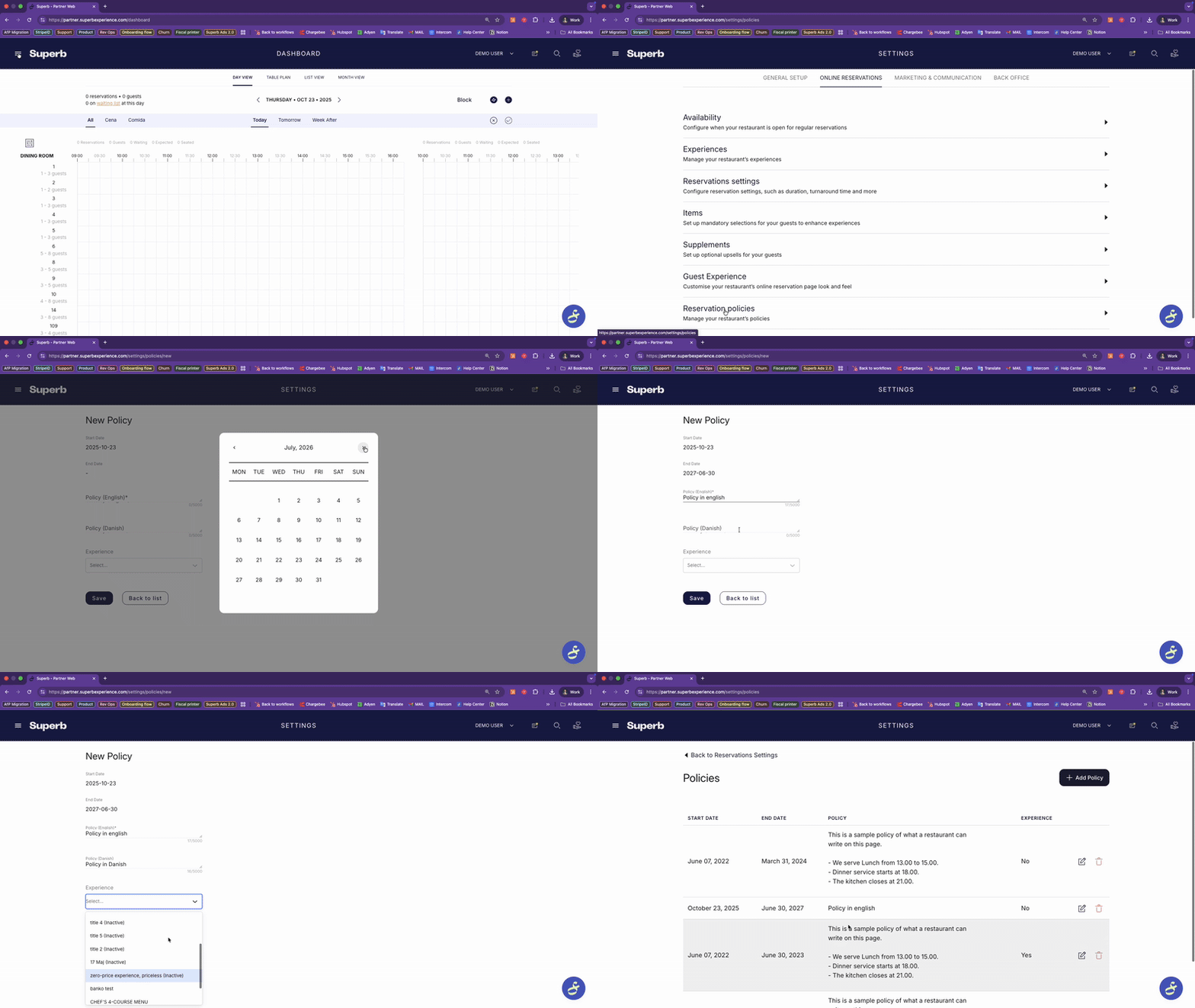
- From the Dashboard, click SETTINGS.
- Click Online Reservations.
- Click Reservation Policies.
- Click ADD POLICIES.
- Set a Start Date. The start date is required.
- Set an End Date. The end date is required.
- Write your Policy text in each language you offer.
- Choose the Experience the policy applies to, if the policy applies to one experience.
- Click SAVE.
Each experience needs its own reservation policy, because the terms for each experience can differ.
What to include in a reservation policy
- Booking duration and delay rules
- Cancellation and no-show terms
- Prepayments, deposits, and refunds
- Booking information such as allergy handling and group rules
- Pet policy, if relevant
- How guests contact you to change a reservation
Reservation policy template
Adapt the text below and replace every value in brackets with your own terms.
INTRODUCTION
Dear guest, thank you for booking with us. By confirming your reservation, you accept the following terms.
DURATION AND DELAYS
- Your table is reserved for X hours.
- Tell us if you are running late.
- Delays over X minutes may lead to cancellation, and the table may be given to another guest.
CANCELLATION AND NO-SHOW
- Cancellations are accepted up to [X hours/days] before the reservation, using the link in your confirmation email.
- No-shows and late cancellations are charged €X per guest using the card on file.
PREPAYMENTS AND REFUNDS
- All sales are final.
- If you need to reschedule, we can offer a gift card if you ask X hours/days in advance.
ALLERGIES AND DIETARY NEEDS
- State any dietary restrictions when you book.
- We may not be able to accommodate allergies reported less than 24 hours before your visit.
LARGE GROUPS
- Groups of 6 or more are served our fixed menu.
- For 8 or more guests, we may split the party across nearby tables.
- A €X deposit per person is required at booking for groups over 8.
PET POLICY
- Pets are not allowed in our restaurant.
CHANGES OR QUESTIONS
- To change or cancel your booking, call us on [phone number].
- For questions, email us at [email address].
Cover no-show fees in your reservation policy
A no-show fee can only be charged when the no-show fee is described in the reservation policy the guest accepted.
- Write the no-show fee amount and the conditions for charging it into the Policy text.
- Guests must enter credit card details at booking for a no-show fee to be chargeable.
- Without the no-show fee in the reservation policy, the fee cannot legally be charged, and the guest wins a card dispute.